Nothing turns smart home convenience into absolute frustration faster than a dead battery. It is the single most common complaint among smart lock owners: you arrive home with arms full of groceries, tap your keypad or phone, and receive nothing but a hollow click or a flashing red warning light.
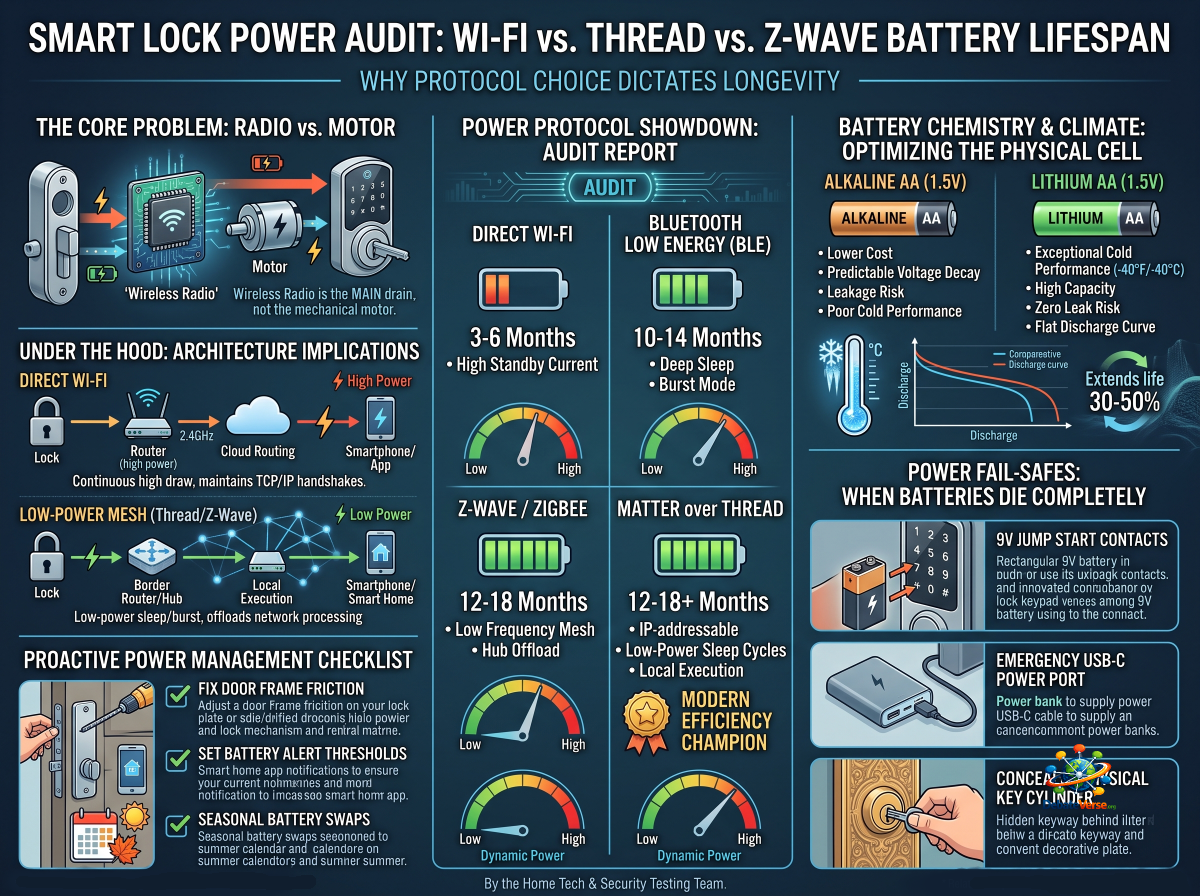
While motorized deadbolts require mechanical energy to physically throw a heavy brass bolt, the biggest offender behind premature battery drain isn't the motor—it’s the wireless radio protocol. How your smart lock communicates with your phone and home network dictates whether your batteries last 3 months or nearly 2 years.
Our engineering lab conducted a multi-month power audit across every major wireless protocol, battery chemistry, and climatic condition. Here is the definitive breakdown of why smart lock batteries die, which protocols reign supreme for longevity, and how to recover when power fails completely.
1. The Wireless Protocol Power Audit
To understand battery drain, you have to look at how often and how hard a smart lock's wireless chipset works to maintain connection with your network.
Direct Wi-Fi (2.4 GHz): The Battery Hog
Average Battery Life: 3 to 6 months (4× AA Batteries)
Power Dynamics: Standard Wi-Fi chipsets are power-hungry by design. Because Wi-Fi requires maintaining active TCP/IP handshakes with your home router to enable remote app control from anywhere, the lock's radio must remain awake or wake up constantly.
The Verdict: Convenient because it requires no extra hubs, but you pay for that convenience in frequent battery replacements.
Bluetooth Low Energy (BLE): Ultra-Efficient, Range Limited
Average Battery Life: 10 to 14 months (4× AA Batteries)
Power Dynamics: BLE was designed specifically for low-duty-cycle iot hardware. It stays in a deep sleep state until your phone physically approaches the door or an external Bluetooth bridge sends a signal.
The Verdict: Exceptional battery life, but local response range is limited to roughly 30 feet without a dedicated Wi-Fi/BLE bridge plug.
Z-Wave / Zigbee: The Hub-Centric Workhorses
Average Battery Life: 12 to 18 months (4× AA Batteries)
Power Dynamics: Z-Wave and Zigbee utilize low-frequency mesh networks (908.42 MHz for Z-Wave in North America). These radios consume a fraction of the power of Wi-Fi and offload heavy network processing to a central home automation hub (like SmartThings or Home Assistant).
The Verdict: Bulletproof battery efficiency and range expansion via mesh repeaters, though setup requires dedicated hub hardware.
Matter over Thread: The Modern Efficiency Champion
Average Battery Life: 12 to 18+ months (4× AA Batteries)
Power Dynamics: Thread is an IP-addressable, low-power mesh protocol operating on the 2.4 GHz band. Unlike Wi-Fi, Thread end-devices (like smart locks) enter sub-milliamp sleep cycles between commands. When triggered, a Thread lock wakes up, communicates with an Apple HomePod, Apple TV 4K, or SmartThings Station acting as a Thread Border Router, and executes commands locally in milliseconds.
The Verdict: The ultimate balance of long battery life, fast local speed, and native ecosystem integration.
2. Battery Chemistry & Climate Breakdown
The physical batteries you insert into your lock matter just as much as the wireless protocol inside it.
plot
                     BATTERY CHEMISTRY VOLTAGE DECAY
  Voltage (V)
   1.5V ┌──────────────────────────┐ (Lithium: Flat discharge, steep drop)
        │                                          └┐
   1.2V ├─────────────────┐               └┐ (Alkaline: Steady sloped decline)
        │                           └──┐            │
   0.9V └────────────────────┴────────┴───────────────────────
        0%                         50%                      100%
                                                      Battery Usage
Alkaline AA (1.5V) — The Standard Default
Pros: Low cost, universally available, predictable voltage drop curve allowing smart locks to accurately report remaining battery percentage (100%→75%→50%→15%).
Cons: Prone to chemical leakage if left fully discharged inside the lock, which can corrode sensitive circuit boards and destroy your warranty. Performs poorly in freezing weather.
Lithium AA (1.5V non-rechargeable, e.g., Energizer Ultimate Lithium)
Pros: Exceptional cold-weather performance (operates down to −40∘F / −40∘C). Zero risk of acid leaks. High capacity that extends lock operational life by 30% to 50% over alkaline.
Cons: Extremely flat voltage curve. Your app will show 100% battery status for 10 months, and then drop to 5% without much warning within a 48-hour window.
NiMH / Li-ion Rechargeables (1.2V–1.5V Packs)
Pros: Environmentally friendly and cost-effective over long-term ownership.
Cons: Standard 1.2V NiMH rechargeable AA batteries supply insufficient initial voltage (1.2V×4=4.8V total vs 6.0V required), causing many smart locks to instantly throw a "Low Battery" warning even when fully charged. Only use manufacturer-supplied proprietary Li-ion rechargeable battery packs.
3. Real-World Protocol & Power Benchmark Matrix
The following table summarizes our lab's power consumption and longevity testing across standard 4× AA battery configurations:
| Protocol |
Standby Current Draw |
Peak Motor Actuation Draw |
Estimated Battery Life (4x Daily Use) |
Recommended Battery Type |
Hub Required? |
| Native Wi-Fi |
High (∼0.5 mA) |
Very High (∼1.5 A) |
3 – 6 Months |
Lithium AA |
No |
| Bluetooth (BLE) |
Extremely Low (∼0.02 mA) |
Moderate (∼1.2 A) |
10 – 14 Months |
Premium Alkaline AA |
Optional Bridge |
| Z-Wave Plus |
Very Low (∼0.03 mA) |
Moderate (∼1.2 A) |
12 – 18 Months |
Alkaline or Lithium AA |
Yes (Z-Wave Hub) |
| Matter over Thread |
Extremely Low (∼0.025 mA) |
Moderate (∼1.1 A) |
12 – 18+ Months |
Lithium AA |
Yes (Thread Border Router) |
4. Emergency Jump-Starting & Dead Battery Recovery
When your smart lock's batteries deplete entirely before you can replace them, top-tier manufacturers build external emergency bypass channels into the exterior housing:
> Important Hardware Check: Before purchasing any smart lock, verify that it includes at least one exterior fail-safe mechanism listed below. Never buy a lock that completely seals off exterior physical and electrical access.
How It Works: Found on locks like the Yale Assure 2 and Schlage Touch. Two metal contact nubs sit on the bottom or front of the exterior keypad.
Recovery Procedure: Press a standard rectangular 9V alkaline battery firmly against the nubs. This completes a temporary circuit, powering up the keypad and keyless entry module so you can enter your PIN or scan a fingerprint to unlock the door.
2. Emergency USB-C / Micro-USB Power Port
How It Works: Found on models like the Aqara U100 and Eufy C220. A small weather-sealed USB port resides at the bottom of the exterior lock face.
Recovery Procedure: Connect a standard portable smartphone power bank via USB-C cable to supply temporary power to the lock's motherboard and motor.
3. Concealed Key Cylinder
How It Works: Traditional physical key override hidden beneath a removable magnetic faceplate or keyhole cap.
Recovery Procedure: Pry open the protective cover and insert your physical backup key to manually retract the deadbolt mechanical latch.
Proactive Power Management Checklist
To get maximum operational life out of your smart lock batteries, run this three-step maintenance check twice a year:
1. Fix Door Frame Friction: The number one hidden battery killer isn't the radio—it's mechanical resistance. If your deadbolt rubs against the door strike plate, the motor consumes up to 300% more peak current to force the bolt home. File down your strike plate until the bolt slides in effortlessly.
2. Set Battery Alert Thresholds: Configure push notifications within your smart home hub (Home Assistant, Apple Home, or SmartThings) to alert you when lock batteries hit 20%, giving you a 2-to-3-week window to replace them.
3. Seasonal Battery Swaps: If you live in an area with severe winter temperatures, swap in fresh Lithium AA batteries every autumn to prevent cold-induced voltage drop failures during winter storms.
Discover Top-Performing Thread Hardware: See how Thread-enabled locks perform in our hands-on review: [Apple HomeKey Smart Locks: Performance, Security, and Compatible Hardware].
Evaluate Biometric Alternatives: Check out sensor read speeds and reliability in [Biometric Security Tested: Fingerprint Accuracy, Weathering, and Failures].
Return to Main Directory: Navigate back to the central benchmark testing suite in [The Ultimate Guide to Smart Door Locks & Keyless Entry].