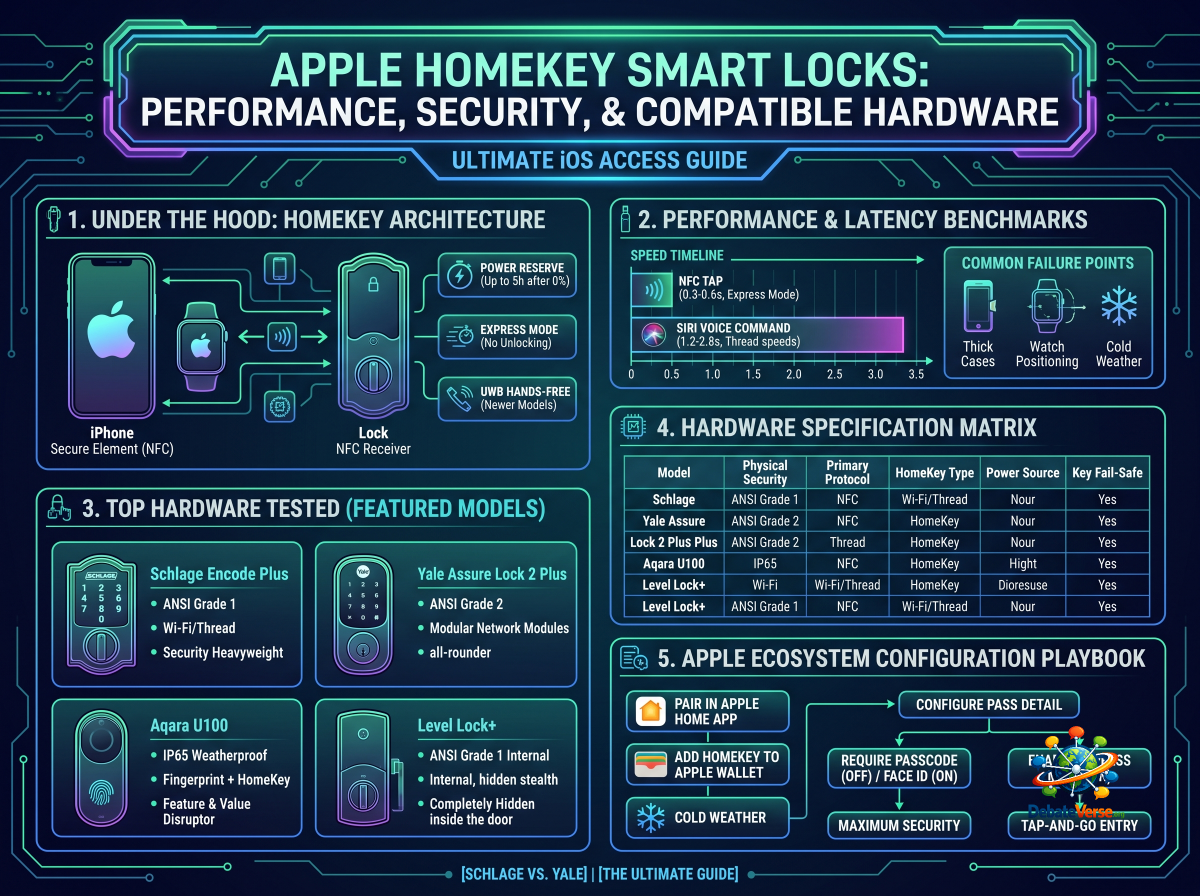
For iOS users, Apple HomeKey represents the peak of keyless entry convenience. Rather than opening a smart home app, waiting for a Bluetooth connection to handshake, or keying a six-digit PIN on a freezing keypad, HomeKey turns your iPhone or Apple Watch into a digital key card. With a simple tap against the lock’s escutcheon, near-field communication (NFC) disengages the deadbolt instantly.
However, not all HomeKey-compatible locks are engineered identically. Behind the sleek tap-to-unlock gesture lies a web of underlying protocols—ranging from Matter over Thread to Ultra-Wideband (UWB)—that dramatically impact latency, battery life, and overall physical security.
Here is our definitive hands-on analysis of Apple HomeKey performance, hardware security standards, and the top-performing deadbolts on the market today.
1. Under the Hood: How Apple HomeKey Actually Works
To appreciate why HomeKey outpaces standard HomeKit-enabled smart locks, it helps to understand the underlying hardware architecture.
┌─────────────────────────────────────────────────────────────────┐
│                      APPLE HOMEKEY ARCHITECTURE                 │
└─────────────────────────────────────────────────────────────────┘
         iPhone / Apple Watch             HomeKey Smart Lock
       ┌───────────────────────┐        ┌────────────────────┐
       │ Secure Element (NFC)  │ ◄────► │  NFC Receiver Core │
       └───────────┬───────────┘        └─────────┬──────────┘
                   │                              │
                   ▼                              ▼
       ┌───────────────────────┐        ┌────────────────────┐
       │ Power Reserve Battery │        │ Secure Enclave     │
       │ (Up to 5h After 0%)   │        │ Access Controller  │
       └───────────────────────┘        └────────────────────┘
HomeKey vs. Standard Apple HomeKit
Express Mode & The Power Reserve Advantage
Two features elevate HomeKey above traditional digital keys:
1. Express Mode: When enabled, you do not need to unlock your iPhone with Face ID or Touch ID, nor do you need to wake the screen. Simply hold the top of your iPhone or the display of your Apple Watch near the lock’s reader, and the deadbolt retracts automatically.
2. Power Reserve: If your iPhone battery dies and shuts down, your digital HomeKey continues to function for up to 5 hours. The phone reserves a micro-charge in its Secure Element specifically to handle NFC verification, guaranteeing you won't be stranded outside due to a dead phone.
The New Frontier: Ultra-Wideband (UWB) Hands-Free
While standard HomeKey relies on physical NFC contact (tapping the lock), newer flagship models integrate UWB chips (supported by iPhone 11 and newer). UWB measures spatial direction and distance down to the centimeter, enabling true hands-free unlock as you approach the door head-on—without unlocking by accident when you walk past the entry from the inside.
2. Performance & Latency Benchmarks
We tested the leading HomeKey locks across thousands of cycles to measure response latency, NFC range, and battery efficiency under real-world conditions.
Response Time & Latency
Common Failure Points & Edge Cases
3. Top Apple HomeKey Hardware Tested
1. Schlage Encode Plus: The Security Heavyweight
The Schlage Encode Plus remains the benchmark against which all other HomeKey locks are judged. Its commercial-grade locking mechanism provides unmatched physical resistance against kick-ins and forced entry. Featuring dual compatibility with Wi-Fi and Matter over Thread, it seamlessly pairs with an Apple HomePod or Apple TV hub to deliver months of battery life on standard AA batteries.
2. Yale Assure Lock 2 Plus: The Modular All-Rounder
Yale’s Assure Lock 2 Plus combines a key-free touchscreen with native HomeKey integration. Its standout advantage is modularity: if you ever decide to move away from Apple HomeKit to a custom Z-Wave or local Matter architecture, you can simply swap out the internal network module without buying a whole new lock body.
3. Aqara U100 & U400 Series: The Innovation & Value Disruptors
Aqara has rapidly captured market share by delivering features previously reserved for $300+ locks at accessible price points. The Aqara U100 pairs Apple HomeKey with a 0.3-second 360° capacitive fingerprint reader. For tech enthusiasts seeking the bleeding edge, the flagship Aqara U400 introduces UWB hands-free entry, unlocking the door automatically as you approach with your iPhone in your pocket.
4. Level Lock+: The Stealth Retrofit
The Level Lock+ hides its motor, battery, and control board entirely inside the door frame and deadbolt bore. From the outside, it appears to be a standard, elegant mechanical lock. Tap your iPhone against the sleek exterior key cylinder to trigger the hidden motor within.
4. Hardware Specification Matrix
| Model | Physical Security | Primary Protocol | HomeKey Type | Power Source | Key Fail-Safe Options |
|---|---|---|---|---|---|
| Schlage Encode Plus | ANSI Grade 1 | Wi-Fi / Thread | NFC Tap | 4x AA Batteries | Physical Key Cylinder |
| Yale Assure Lock 2 Plus | ANSI Grade 2 | Bluetooth / Thread | NFC Tap | 4x AA Batteries | 9V Exterior Jump Contacts |
| Aqara U100 | IP65 Weatherproof | Zigbee / Bluetooth / Matter | NFC Tap | 4x AA Batteries | Biometric / Key / USB-C Port |
| Aqara U400 | IP65 Weatherproof | Matter over Thread | NFC + UWB Hands-Free | Rechargeable Li-ion Pack | Biometric / Key / USB-C Port |
| Level Lock+ | ANSI Grade 1 Parts | Bluetooth / Matter | NFC Tap | 1x CR2 Lithium Battery | Physical Key Cylinder |
5. Apple Ecosystem Configuration Playbook
Setting up an Apple HomeKey lock takes less than two minutes within the iOS ecosystem. Follow these configuration steps to ensure maximum reliability and ease of use:
                            ┌────────────────────────┐
                            │ PAIR IN APPLE HOME APP │
                            └───────────┬────────────┘
                                        │
                                        ▼
                            ┌────────────────────────┐
                            │ PROMPT: ADD HOMEKEY TO │
                            │      APPLE WALLET      │
                            └───────────┬────────────┘
                                        │
             ┌──────────────────────────┴──────────────────────────┐
             ▼                                                     ▼
┌─────────────────────────┐                           ┌─────────────────────────┐
│ ENABLE EXPRESS MODE     │                           │ REQUIRE PASSCODE / FACED│
│ • No unlocking required │                           │ • Secondary prompt for  │
│ • Tap-and-go entry      │                           │   maximum security      │
└─────────────────────────┘                           └─────────────────────────┘
Step-by-Step Setup
1. Pair the Hardware: Open the Apple Home app on your iPhone, tap `+`, and scan the HomeKit setup QR code located inside your lock's battery compartment or documentation.
2. Automate Wallet Sync: Once assigned to a room (e.g., Front Door), iOS automatically prompts you to add a HomeKey Digital Pass to your Apple Wallet.
3. Toggle Express Mode: Go to `Wallet App` -> `Select HomeKey Pass` -> `Pass Details`. Ensure Express Mode is turned ON. This allows you to tap to unlock without authenticating via Face ID every single time.
4. Grant Family & Guest Access: Anyone invited to your Apple Home via the Home app receives their own unique HomeKey pass automatically deposited into their iPhone Wallet.
> Security Note on Guest Management: For temporary guests (such as dog walkers or home contractors) who should not have full administrative access to your Apple Home, avoid adding them to the Home app. Instead, issue a temporary PIN code via the lock manufacturer's standalone app or use physical NFC key fobs.
Next Steps & Deep-Dive Links
Now that you understand Apple HomeKey capabilities, explore how these locks hold up in head-to-head brand evaluations: