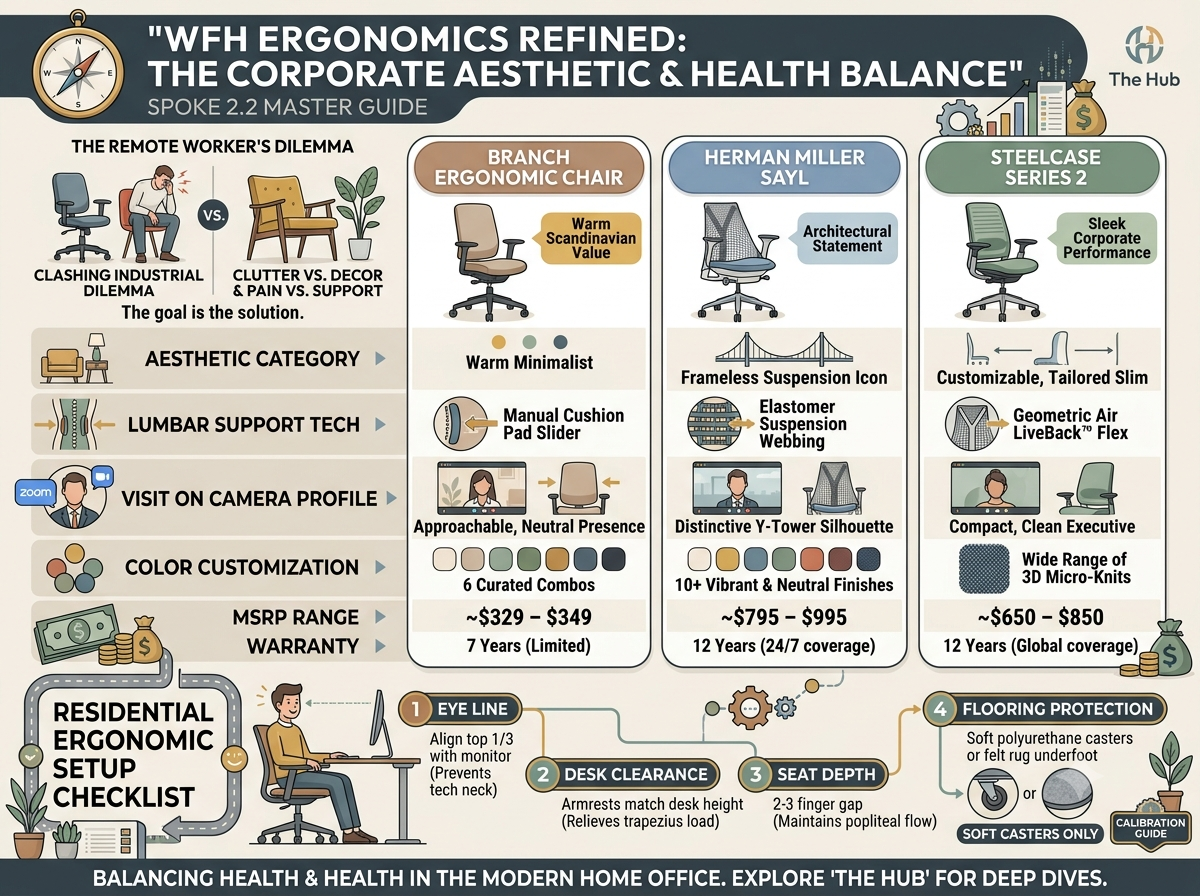
The shift to permanent remote and hybrid work has forced corporate professionals to confront a difficult design tradeoff: how to maintain enterprise-grade spinal support without turning a home office into a clinical, industrial cubicle.
For the first year of remote work, millions of knowledge workers relied on dining room chairs or trendy mid-century modern accent seats. The result has been a predictable wave of lower back stiffness, upper thoracic strain, and hip misalignment. However, rolling a bulky, aggressive-looking black executive chair into a sunlit bedroom or living-room nook compromises residential decor and looks visually jarring on high-stakes Zoom calls.
Modern seating engineering has solved this friction point. Today’s top remote office chairs combine hidden adjustment mechanics, organic silhouettes, and curated fabric palettes with medical-grade ergonomics.
> Direct Answer / Quick Verdict:
> The Branch Ergonomic Chair is the best value choice for corporate remote workers seeking clean Scandinavian design, high-density seat cushioning, and a $300–$350 price point. For professionals looking to make an architectural design statement on camera while maintaining premium posture support, the Herman Miller Sayl is unmatched. If you require deep corporate ergonomics with a slim, customizable footprint, the Steelcase Series 2 offers the best performance-to-aesthetic ratio.
To see how these residential-friendly models fit into the broader seating ecosystem, explore our master Ultimate Ergonomic Office Chair Buyer’s Guide.
At-a-Glance Comparison for Remote Corporate Workers
| Vector / Model | Branch Ergonomic Chair | Herman Miller Sayl | Steelcase Series 2 |
|---|---|---|---|
| Aesthetic Category | Warm Scandinavian Minimalist | Architectural Statement / Suspension | Sleek Corporate Slim Profile |
| Primary Lumbar Tech | Height-Adjustable Cushion Pad | Elastomer Suspension Webbing | Air LiveBack™ Geometric Flex |
| Visual Footprint | Low Profile, Soft Contours | Frameless Iconic Silhouette | Ultra-Compact, Tailored Backrest |
| Color Customization | 6 Curated Fabric / Frame Combos | 10+ Vibrant & Neutral Finishes | Wide Range of 3D Micro-Knit Fabrics |
| Frame Mechanics | Concealed Adjustment Levers | Y-Tower Architectural Frame | Integrated Slim Control Assembly |
| MSRP Range | $329 – $349 | $795 – $995 | $650 – $850 |
| Warranty | 7 Years (Limited) | 12 Years (24/7 Coverage) | 12 Years (Global Coverage) |
The WFH Aesthetic Dilemma: Decor vs. Orthopedic Health
Corporate professionals operating from residential spaces face three distinct workplace challenges that standard commercial office setups ignore:
                      THE WFH WORKSTATION TRIAD
  ┌──────────────────────────────────────────────────────────────────────────┐
  │ 1. VISUAL HARMONY ──► Blending office hardware into home interior design  │
  │ 2. ON-CAMERA PROFILE ──► Professional, non-distracting background presence│
  │ 3. ACOUSTIC & FLOORING ──► Smooth movement on hardwood/carpet without noise │
  └──────────────────────────────────────────────────────────────────────────┘
1. Visual Intrusion: Industrial office chairs with exposed gas cylinders, heavy chrome bases, and mechanical tilt knobs clash with warm residential aesthetics, making dedicated workspace corners feel cluttered.
2. The "Zoom Profile" Effect: On video calls, high-backed executive chairs with wide headrests block natural light and project an overly dominant, aggressive backdrop. A mid-backed chair with a refined silhouette keeps the focus on you, maintaining an approachable, executive presence on camera.
3. Residential Floor Surface Compatibility: Standard hard-plastic commercial casters can scratch residential hardwood, gouge laminate, or snag plush area rugs. Modern WFH chairs utilize soft polyurethane casters designed to roll quietly without ruining home flooring.
Top 3 Aesthetic Ergonomic Chairs for the Home Office
1. Branch Ergonomic Chair: The Best Minimalist Value
The Branch Ergonomic Chair was built specifically to solve the remote worker's aesthetic crisis. Designed in Italy and refined for home environments, it offers a soft, rounded profile that feels intentional in any residential setting.
BRANCH ERGONOMIC CHAIR HIGHLIGHTS:
• Soft Scandinavian design language hides complex mechanical levers.
• Double-woven breathable nylon mesh backrest keeps you cool during meetings.
• High-density molded foam seat pan prevents tailbone compression.
• Available in curated residential tones (Light Gray, Dark Teal, Mustard, Black).
> 🔗 Related Article: Branch Ergonomic Chair vs. FlexiSpot BS11 Pro: The $300–$500 DTC Showdown
2. Herman Miller Sayl: The Architectural Statement Piece
Designed by Yves Béhar, the Herman Miller Sayl draws inspiration from the engineering of suspension bridges (such as the Golden Gate Bridge). It replaces traditional foam and fabric backrests with an unframed, strand-suspended elastomer back.
HERMAN MILLER SAYL HIGHLIGHTS:
• Frameless elastomer backrest provides suspension support while maximizing airflow.
• Y-Tower structural spine creates an iconic design silhouette on camera.
• Compact footprint fits comfortably into apartment nooks and small home offices.
• 93% recyclable construction with eco-friendly design elements.
3. Steelcase Series 2: Corporate Ergonomics in a Slim Footprint
If you want the biomechanical engineering of Steelcase’s enterprise-grade chairs wrapped in a sleek, customizable package, the Steelcase Series 2 is an exceptional middle ground.
STEELCASE SERIES 2 HIGHLIGHTS:
• Air LiveBack™ technology uses geometric wave patterns to flex with your spine.
• Ultra-slim backrest profile keeps the physical footprint minimal.
• Customization options include 3D Micro-Knit mesh, upholstered, or exposed back.
• Responsive weight-activated recline mechanism requires zero manual tuning.
> 🔗 Related Article: The Best Ergonomic Chairs Under $500: Premium Comfort Without the Premium Price
The Residential Ergonomic Setup Checklist
Integrating a high-performance chair into a home environment requires proper physical calibration to ensure long-term health:
                  HOME OFFICE POSTURE CALIBRATION
  [ EYE LINE ]    ──► Align top 1/3 of monitor (prevents forward neck lean)
  [ DESK CLEARANCE ] ──► Armrests match desk height (relieves trapezius load)
  [ SEAT DEPTH ]  ──► 2-3 finger gap behind knees (maintains popliteal flow)
  [ FLOORING ]    ──► Soft polyurethane casters or felt desk pad underfoot
1. Check Your Desk Clearance: Ensure your 3D or 4D armrests slide smoothly underneath your home desk. If your armrests hit the desk drawer or frame, you will be forced to reach forward, causing shoulder elevation and upper back strain.
2. Protect Your Hardwood Floors: If your chair features standard plastic casters, replace them with soft polyurethane rollerblade-style casters to prevent scratches on hardwood or laminate flooring.
3. Calibrate Seat Slider Depth: Adjust the seat pan until there is a 2-to-3 finger gap between the seat cushion edge and the back of your calves to maintain optimal blood flow.
4. Position Lumbar at Beltline: Slide the internal or external lumbar pad into the small of your back, directly above your beltline, to prevent pelvic rotation while typing.
> 🔗 Related Article: Lumbar Support Decoded: Passive, Dynamic, and Adjustable Systems Explained
Frequently Asked Questions (FAQ)
Can an aesthetic office chair provide real ergonomic support for back pain?
Yes, provided the chair includes foundational posture features. Look for chairs that feature active lumbar support (such as the Branch height-adjustable pad or Steelcase Air LiveBack™), seat depth adjustment, and multi-axis armrests. Avoid decorative dining or mid-century accent chairs that lack adjustability, as they force the spine into static flexion.
What color office chair looks best on video calls?
Neutral, mid-tone colors like Light Gray, Dark Teal, or Taupe tend to look best on camera. High-contrast white frames can cause exposure problems with webcams, while pitch-black executive chairs can create a dark, silhouette effect against light-colored residential walls.
How do I stop my office chair from damaging my home hardwood floors?
Upgrade your chair's stock casters to rubber or polyurethane rollerblade-style casters with standard 11mm x 22mm stems. Alternatively, place a low-profile clear polycarbonate mat or a flat-weave wool desk rug underneath your workstation area.