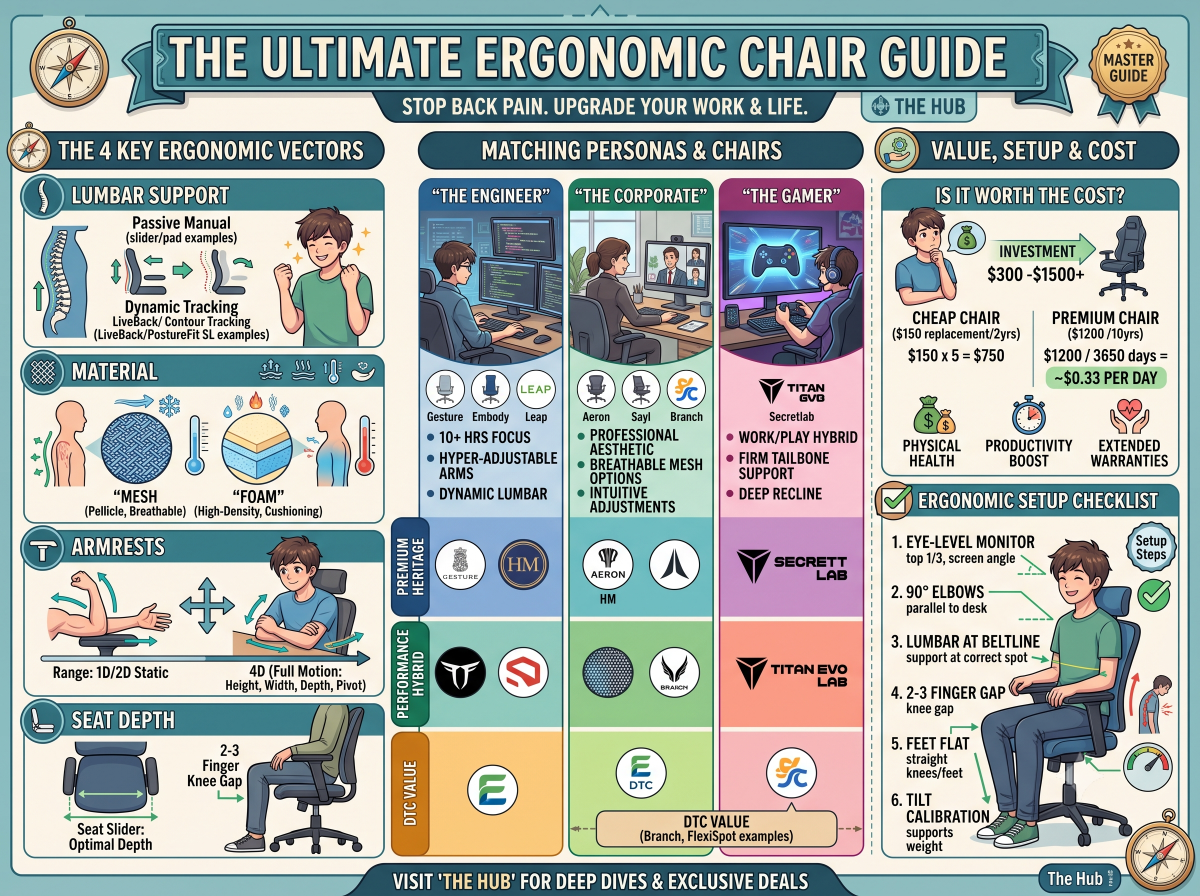
The Ultimate Ergonomic Office Chair Buyer’s Guide: Stop Back Pain & Upgrade Your Desk
Sitting for 8 to 12 hours a day on an unsupportive chair is a quiet tax on your health, focus, and long-term earning potential. Biomechanical studies confirm that improper seating increases lumbar disc pressure at the L4/L5 vertebrae by up to 40% compared to standing. Over a multi-year period, this static compression manifests as chronic lower back stiffness, sciatica, upper-thoracic tension, and fatigue.
Investing in a high-performance ergonomic chair between $300 and $1,500+ is not an cosmetic office upgrade; it is preventative health infrastructure. Over an average 10-year lifespan, a $1,200 chair costs approximately $0.33 per day—a fraction of the price of physical therapy, chiropractic adjustments, or lost productivity caused by persistent spinal discomfort.
This master buyer's guide breaks down the critical engineering mechanics, brand ecosystems, and personal use cases to help you choose the right seat for your desk.
1. Quick-Reference Decision Matrix
The high-end seating market divides into three distinct categories: Heritage Ergonomic Brands, High-Performance Hybrids, and Direct-to-Consumer (DTC) Value Innovators. Use this comparison table to baseline the top models across the market.
| Brand | Flagship Model | Price Range | Primary Persona | Core Mechanical Advantage | Warranty Coverage |
|---|---|---|---|---|---|
| Herman Miller | Aeron / Embody | $1,200 – $1,800 | Engineers & Corporate | Pellicle suspension mesh & dynamic pixel matrix | 12 Years (24/7 multi-shift) |
| Steelcase | Gesture / Leap v2 | $1,000 – $1,600 | Heavy Computer Users | LiveBack flex technology & 360° arm articulation | 12 Years (Global coverage) |
| Secretlab | Titan Evo | $500 – $650 | Gamers & Hybrid Workers | Cold-cure foam firmness & L-ADAPT lumbar engine | 3 to 5 Years |
| Branch | Ergonomic Chair | $300 – $450 | WFH Corporate Staff | Clean Scandinavian design with essential adjustments | 7 Years (Limited) |
| FlexiSpot | BS11 Pro / OC3 | $300 – $500 | Budget WFH Setups | High-feature density at an entry-level price point | 3 to 5 Years |
2. The 4 Non-Negotiable Ergonomic Vectors
Marketing departments often dilute the term "ergonomic." True ergonomic support relies on four precise engineering vectors that isolate and stabilize your body’s pressure points.
Vector 1: Lumbar Support Systems
The human spine naturally maintains an inward 'S-curve' (lordosis). When sitting, the pelvis rotates backward, flattening this curve and loading weight directly onto spinal discs.
> 🔗 Deep Dive: Lumbar Support Decoded: Passive, Dynamic, and Adjustable Systems Explained
Vector 2: Material Construction (Suspended Mesh vs. Molded Foam)
> 🔗 Deep Dive: Mesh vs. High-Density Foam: Which Seat Material Prevents Back Strain?
Vector 3: Armrest Articulation (1D to 4D Movement)
Your arms account for roughly 10% of your total body weight. Without proper forearm support, that load shifts to your trapezius and neck muscles.
> 🔗 Deep Dive: The Importance of 4D Armrests & Seat Depth in Preventing RSI
Vector 4: Seat Depth & Tilt Dynamics
3. Brand Ecosystem & Market Spectrum
   [ \$300 - \$600 ]                    [ \$400 - \$650 ]                   [ \$1,000 - \$1,800+ ]
Direct-To-Consumer / Value        Performance Gaming Hybrids             Heritage Ergonomic Tier-1
  (Branch, FlexiSpot)                 (Secretlab)                      (Herman Miller, Steelcase)
Heritage / Tier-1 Tier ($1,000–$1,800+)
Performance Gaming Hybrid Tier ($400–$600)
Direct-to-Consumer / Value Tier ($300–$600)
4. Matching Your Persona to the Right Chair
The Remote Corporate Worker
The Software Engineer
> 🔗 Deep Dive: Head-to-Head: Herman Miller Aeron vs. Steelcase Gesture
The Full-Time Gamer
> 🔗 Deep Dive: Full-Time Gamers vs. WFH: Gaming Chairs vs. True Ergonomic Chairs
5. Ergonomic Setup & Maintenance Checklist
Purchasing a top-tier chair is only half the battle. If your seat is miscalibrated to your desk surface, you will still experience pain. Follow this step-by-step calibration procedure upon delivery:
                  [ EYE LEVEL ] ──► Top 1/3 of Monitor
                        │
                  [ 90° ELBOWS ] ──► Parallel to Desk / 4D Armrests
                        │
                  [ 90° KNEES ]  ──► Feet Flat / 2-3 Finger Popliteal Gap
1. Set Seat Height First: Adjust the chair height until your feet rest flat on the floor with your knees bent at a clean 90-degree angle. Your thighs should sit parallel to the ground.
2. Adjust Seat Depth: Slide the seat pan forward or backward until there is a 2-to-3 finger gap between the front edge of the seat pad and the back of your calves.
3. Position the Lumbar Support: Align the lumbar pad or curve directly into the curve of your lower back—just above your beltline. It should support, not push aggressively against, your lower spine.
4. Set 4D Armrest Height: Raise or lower the armrests until your shoulders are fully relaxed (not shrugged) and your forearms form a 90-degree angle to your keyboard.
5. Calibrate Tilt Tension: Adjust the tilt resistance so the chair supports your weight when sitting upright, but recline requires only slight backward pressure.
Evaluating Warranty Value
> 🔗 Next Step: Are $1,000+ Office Chairs Worth It? The 10-Year Cost-Per-Day Breakdown