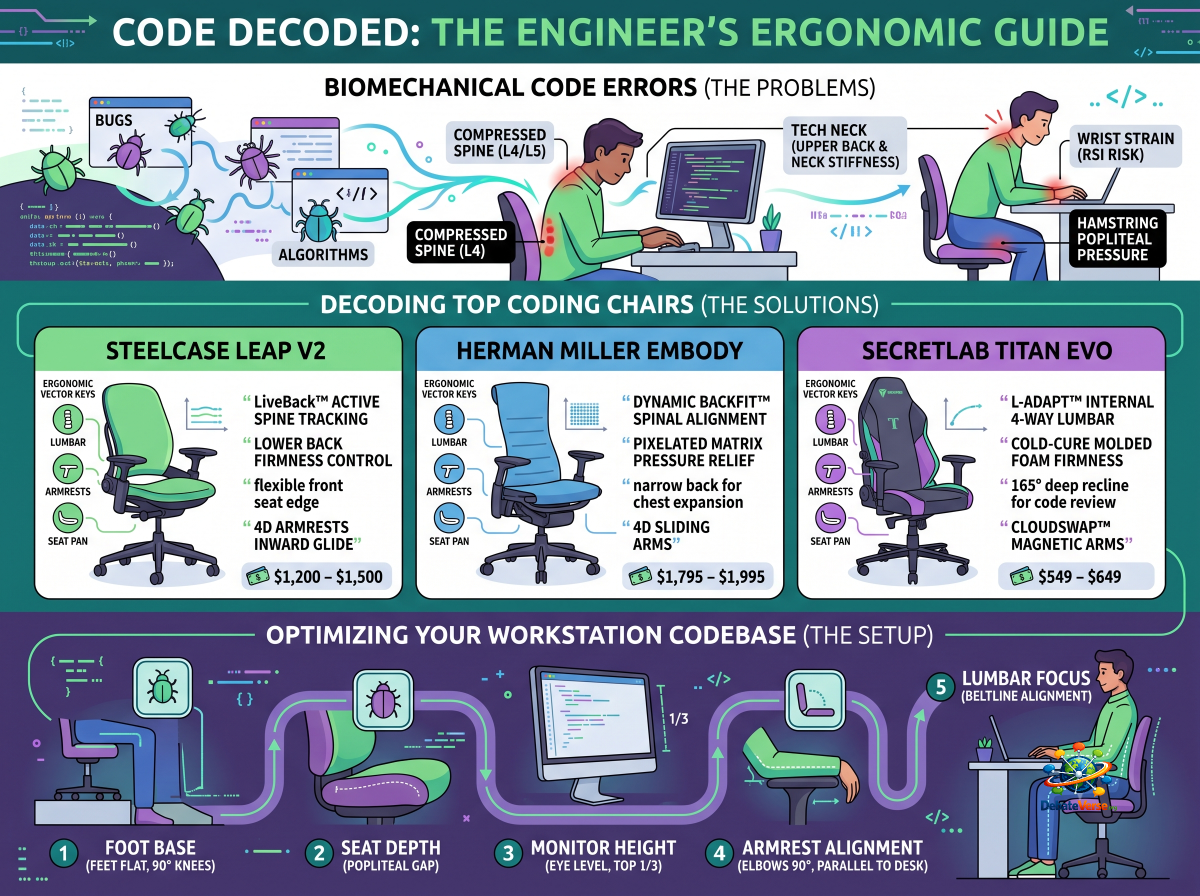
Software engineering is one of the most physically demanding sedentary professions in the modern workforce. Deep-focus coding cycles, multi-system debugging marathons, and continuous sprint deadlines force developers into static sitting positions for 10 to 14 hours a day. Over time, this static load manifests as chronic L4/L5 lumbar compression, upper thoracic stiffness ("tech neck"), and Repetitive Strain Injury (RSI) in the wrists and shoulders.
Standard office seating fails under these conditions because it assumes a standard 8-hour day with frequent movement. Software developers need seating infrastructure designed for prolonged focus, featuring active lumbar tracking, multi-axis arm support, and pressure-mitigating seat pans.
> Direct Answer / Quick Verdict:
> The overall best office chair for software engineers is the Steelcase Leap v2 due to its live lumbar tracking, highly adjustable 4D armrests, and flexible seat edge that adapts as you shift between typing postures. For developers seeking maximum spinal weightlessness and heat dissipation, the Herman Miller Embody is the premier choice. For developer-gamers looking for high-density support and deep recline at a mid-tier price point, the Secretlab Titan Evo delivers the best value.
To see how these models compare within the broader market taxonomy, refer to our master Ultimate Ergonomic Office Chair Buyer’s Guide.
At-a-Glance Comparison for Developers
| Vector / Model | Steelcase Leap v2 | Herman Miller Embody | Secretlab Titan Evo |
|---|---|---|---|
| Primary Advantage | Active Spine Tracking & Cushioning | Weightless Pressure Matrix Distribution | Firm Posture Support & Multi-Angle Recline |
| Lumbar Mechanism | LiveBack™ + Lower Back Firmness Dial | Dynamic Backfit™ + Pixelated Matrix | L-ADAPT™ Internal 4-Way System |
| Armrest Performance | Industry-Leading 4D Articulation | 4D Horizontal & Vertical Sliding | 4D Articulation with CloudSwap™ Tops |
| Seat Pan Tech | Flexible Edge + Seat Depth Slider | Suspended Pixel Matrix + Depth Slide | Cold-Cure Molded Foam Pebble Pan |
| Target Developer Build | All Builds (Highly Adaptable) | Tall / Broader Frame Developers | Multi-Size Options (S, Regular, XL) |
| MSRP Range | $1,200 – $1,500 | $1,795 – $1,995 | $549 – $649 |
| Warranty | 12 Years (24/7 Multi-Shift) | 12 Years (24/7 Multi-Shift) | 3 to 5 Years |
The Biomechanics of Marathon Coding
Software development puts unique mechanical stresses on the human frame. Understanding these physiological vectors helps prevent long-term musculoskeletal degradation.
                      BIOMECHANICAL STRESS CYCLE IN CODING
  ┌──────────────────────────────────────────────────────────────────────────┐
  │ Forward Lean (Debugging) ──► Lumbar Flattening ──► 40% Increase in Disc Load │
  │ Static Arm Position (Typing) ──► Trapezius Fatigue ──► Wrist Compression  │
  │ Static Leg Angle ──► Popliteal Vascular Pinch ──► Hamstring Tightness    │
  └──────────────────────────────────────────────────────────────────────────┘
1. Lumbar Disc Compression: When developers lean forward to inspect stack traces or review code on secondary monitors, the pelvis tilts backward, flattening natural lumbar lordosis. This increases disc pressure on the L4/L5 vertebrae by up to 40% compared to standing.
2. Ulnar & Radial Nerve Compression (RSI): Hours spent typing on mechanical keyboards without proper armrest clearance force the trapezius muscles to hold the weight of the arms. If armrests cannot adjust inward to match shoulder width, developers flared their elbows out, straining the ulnar nerve.
3. Popliteal Vascular Restriction: Sitting on a rigid seat pan that is too deep cuts off micro-circulation behind the knees (the popliteal fossa), leading to leg numbness, restless legs, and lower-body fatigue by mid-afternoon.
Top 3 Ergonomic Chairs for Software Engineers
1. Steelcase Leap v2: The Overall Best Chair for Coding
The Steelcase Leap v2 remains the industry standard across enterprise software engineering teams for good reason: it adapts to human motion better than almost any other chair on the market.
STEELCASE LEAP V2 HIGHLIGHTS:
• LiveBack™ Technology flexes independently with upper and lower spine.
• Lower Back Firmness Control lets you increase resistance for intense focus.
• Flexible front seat edge prevents hamstring pressure during forward posture.
• 4D Armrests glide inward to maintain a 90° typing angle over mechanical keyboards.
> 🔗 Related Article: Head-to-Head: Herman Miller Aeron vs. Steelcase Gesture
2. Herman Miller Embody: Best for Pressure Distribution & Oxygenation
Co-designed with orthopedic specialists, the Herman Miller Embody was built to address the physical consequences of extended computer usage. It is particularly effective for developers who experience lower back stiffness or leg numbness during marathon sessions.
HERMAN MILLER EMBODY HIGHLIGHTS:
• Exposed Pixelated Matrix distributes weight evenly across the seat and back.
• Backfit™ Adjustment aligns the chair to your spine's natural curve.
• Narrow backrest profile allows shoulders to pull back for chest expansion.
• Multi-layer Sync fabric with thermal dissipation keeps you cool.
> 🔗 Related Article: Secretlab Titan Evo vs. Herman Miller Embody: High-End Hybrid vs. Peak Ergonomics
3. Secretlab Titan Evo: Best Value Hybrid for Programmer-Gamers
For software engineers working with a mid-range budget who want a seat that handles both 10-hour coding marathons and evening gaming, the Secretlab Titan Evo provides a feature-rich, cost-effective alternative to $1,200+ task chairs.
SECRETLAB TITAN EVO HIGHLIGHTS:
• Cold-Cure Molded Foam base maintains pelvic stability and prevents bottoming out.
• L-ADAPT™ Internal Lumbar Engine adjusts for both height and depth via dual dials.
• 165° Deep Recline enables comfortable code reviews and casual reading.
• CloudSwap™ Magnetic Armrests allow quick swapping between PU and cooling gel tops.
> 🔗 Related Article: Full-Time Gamers vs. Work-From-Home: Gaming Chairs vs. True Ergonomic Chairs
Essential Ergonomic Calibration Features for Developers
When shopping for a desk chair for software development, focus on these three essential features:
                     CRITICAL CODING ERGONOMIC VECTORS
  ┌────────────────────────────────────────────────────────────────────────┐
  │ 1. 4D Armrest Inward Pivot  ──► Eliminates shoulder flare during typing  │
  │ 2. Dynamic Lumbar Depth     ──► Maintains L1-L5 lordosis during forward lean│
  │ 3. Seat Depth Slider        ──► Preserves popliteal blood flow behind knees│
  └────────────────────────────────────────────────────────────────────────┘
1. Inward Armrest Pivot: If your armrests only move up and down, your elbows will flare out when typing on a keyboard, straining your trapezius muscles. Look for 4D armrests that pivot inward to support forearms parallel to your desk.
2. Dynamic Lumbar Depth: Fixed lumbar pads can push forcefully into the spine. Software engineers require lumbar systems that adjust in both height and depth—or dynamically flex—to accommodate shifting posture throughout the day.
3. Seat Depth Adjustment (Seat Slider): Ensure the chair provides 2 to 3 inches of seat depth adjustment. You should always maintain a 2-to-3 finger gap between the front edge of the seat cushion and the back of your knees to preserve circulation.
> 🔗 Related Article: The Importance of 4D Armrests & Seat Depth in Preventing RSI
Workspace Setup Checklist for Engineers
Calibrating your chair to match your monitor arm and desk setup is crucial for preventing posture strain:
1. Set Seat Height First: Adjust your seat height until your feet rest flat on the floor with your knees bent at a 90-degree angle.
2. Align 4D Armrests with Desk Surface: Raise or lower the armrests until your forearms rest parallel to your desk surface with your shoulders completely relaxed.
3. Position Primary Monitor at Eye Level: The top third of your primary coding screen should align directly with your eye line to eliminate forward neck tilt.
4. Calibrate Lumbar Height: Position the lumbar curve directly into the small of your back, just above your beltline.
5. Adjust Seat Depth: Ensure a 2-to-3 finger clearance behind your calves to prevent vascular pressure behind the knees.
Frequently Asked Questions (FAQ)
Is a mesh chair or a foam chair better for software engineers?
It depends on your working environment and comfort preference. Mesh chairs (like the Herman Miller Aeron) provide superior thermal regulation and airflow for warm environments, but their rigid frame perimeters restrict movement. Molded foam or matrix chairs (like the Steelcase Leap v2 or Herman Miller Embody) offer more uniform pressure distribution and accommodate varied sitting positions, such as leaning or shifting legs.
Why do my wrists hurt while coding even though I have ergonomic armrests?
Wrist pain often occurs when armrests are set too low or too far apart, forcing your wrists to bend upward or outward (ulnar deviation) to reach the keyboard. Adjust your 4D armrests so your forearms are fully supported parallel to your desk surface, keeping your wrists neutral and straight while typing.
Is the Steelcase Leap v2 or Steelcase Gesture better for coding?
Both are exceptional chairs, but the Steelcase Leap v2 offers stronger, more defined lower back support via its dual lumbar controls, making it ideal for developers who suffer from lower back fatigue. The Steelcase Gesture features superior 360-degree armrest articulation, making it better for engineers who switch frequently between typing on keyboards, using tablets, and holding mobile devices.